Even though today’s technology and IT systems are becoming more intuitive, the purchase and implementation of an integrated software solution remains a complex project. To achieve success, careful management of the scoping exercise is the starting point for any implementation. Scoping is the process of identifying and outlining the deliverables and work that will be required.
My five key steps to managing scope effectively are:
- Engaging leadership – the importance of management buy-in.
- Understanding the business requirements and developing a business case.
- Choosing the right technology.
- Future-proofing the decision.
- Looking for a strategic partner.
STEP 1: Engaging leadership – the importance of management buy-in
For any project to be a success leadership and strong vision must come from the top. Large-scale IT implementations aim to make an organisation work more efficiently and be more successful. Such projects are often considered high risk because they are business-critical. It’s therefore vital to have management buy-in from the start.
When the senior leadership team is engaged with and fully supportive of a project, it is more likely that the appropriate time and resources will be allocated, letting the project team focus completely on a successful implementation. For example, some companies will invest in additional staff to manage the day-to-day operations so that the internal project management team and key stakeholders can focus exclusively on the implementation, thus avoiding the risk of conflicting priorities.
STEP 2: Understanding the business requirements and developing a business case
The high-level scope of the project should be defined and documented in a business case, with input from all relevant stakeholders, prior to the project kick-off. Once a project starts it may be difficult to change direction without additional cost or delays. Therefore, a company needs to start by understanding what is working and what isn’t – so it doesn’t replicate inefficient processes.
Four essential elements of an IT project business case include:
- Return on investment (ROI). An IT implementation project needs to deliver a strong ROI to justify the implementation and operational costs.
- Highlight the breadth of benefits. A strong business case needs to explain all of the potential benefits and how they can contribute to the bottom line.
- Change management. Without effective change management, including business process documentation and process-driven training, organisations risk poor uptake and the anticipated business benefits will not be fully realised.
- Execution plan. It is vital to remember the end users of the solution. The desired business value will only be achieved with successful execution of the ERP project.
“When the senior leadership team is engaged with and fully supportive of a project, it is more likely that the appropriate time and resources will be allocated”
Alistair Mead, Senior Executive – Microsoft Dynamics AX, UXC Eclipse
STEP 3: Choosing the right technology
There is a wide range of IT systems and software available to solve business challenges. Choosing a solution that works for the business isn’t just about price. It’s equally important to look at a variety of parameters, including:
- Depth vs breadth of functionality
- Industry-specific features
- Ease of support
- Future development path
- Flexibility to adapt to a changing business model
- Integration with existing/future systems
- Cloud versus on-premise hosting
- Analysis tools available
- Scalability.
All these factors must be considered if a company is to choose the right technology for its needs.
STEP 4: Future-proof the decision
It is important to select a solution that maps as closely as possible to the current and future requirements of the business. This is only possible when the future requirements have been visualised and shared with the implementation team. Key stakeholders need to be interviewed and all business-critical requirements discussed upfront. The team can then recommend a technology solution that provides the flexibility and scalability needed to expand with the business.
Adequate support is vital to ensure the ongoing value of the ERP implementation. This should include consultants working with the business team to find new ways to extract value from the system.
Businesses should look for an ERP solution that can integrate proven, industry best-practice workflows with ease, as well as offer the flexibility and scalability they need to cope with future growth and market changes.
STEP 5: Look for a strategic partner
An IT project is not about simply installing new software. There are many stakeholders and complex, mission-critical business processes involved. This means a high quality of work is required, with the scope for customisation and the need for appropriate (technical) support. Look for an implementation partner that has a history in your industry, can provide references from its existing customer base, and can offer qualified, certified professionals to work on your project.
AUCKLAND, 25 February 2015 – Microsoft New Zealand announced today the finalists for the 2015 Microsoft Partner Awards.
Now in its eighth year, the annual Partner Awards exists to recognise excellence in the IT sector from those companies that integrate Microsoft solutions into their products and services to accelerate innovation and go above and beyond customer expectations.
Brent Kendrick, Microsoft New Zealand’s SMB and Partner Lead, says there was an impressive range of entries for the 2015 Awards, with a significant increase in new partners who have never competed before pitching their business solutions for consideration.
“The quality of entries this year has been truly outstanding, and shows the extent to which partners have been joining Microsoft on our journey of transformation towards becoming the productivity and platform company for a mobile-first, cloud first world,” he says.
Kendrick congratulated all finalists, and says he looks forward to seeing them at the black tie gala event to be held on 19 March. The event is open to any and all businesses to attend, and tickets can be purchased through the Partner Awards web site, http://www.microsoft.com/nz/partnerawards/
A full list of awards categories follows:
Cloud Awards
• Cloud Enterprise
Finalists: Datacom, Enlighten Designs, Sitecore, SoftSource
• Cloud Platform
Finalists: NV Interactive, Provoke Solutions, Timely, VMob
• Cloud SMB
Finalists: Atmospheric, Kinetics, SoftSource, The Full Suite
• Hosting
Finalists: OneNet, SoftSource, MHA Cloud Computing
Competency Awards: Application Platform
• Data Analytics
Finalists: Enlighten Designs, Montage, Stellar Consulting, Theta
• Windows App Developer
Finalists: Lazyworm Apps, Marker Metro, Joint (NV Interactive and Intergen)
Competency Awards: Business Applications
• CRM
Finalists: Adaptable Solutions, Datacom, Intergen, Koorb
• ERP
Finalists: Intergen, Koorb, Sable37
Competency Awards: Business Productivity
• Collaboration and Content
Finalists: Datacom, Enlighten Designs, Intergen, Leapthought
• Communications
Finalists: Dimension Data, Lexel, UCFX
Competency Awards: Core Infrastructure
• Datacenter
Finalists: Datacom, Spark Digital
• Devices and Deployment
Finalists: Datacom, Dimension Data, Fujitsu
Individual Awards
• Presales Technical Specialist
Finalists: CodeBlue: Henry Min, Provoke Solutions: Alan Marshall, Spark Digital: David Ollason
Segment Awards
• Education
Finalists: Cyclone, New Era IT, pcMedia
• Innovation Technology for Good Citizenship
Finalists: IT Engine, Koorb
• Learning
Finalists: Ace, Auldhouse, Kinetics, pcMedia
• Marketing
Finalists: Intergen, Kinetics, Origin IT, Provoke Solutions
• Rising Star
Finalists: Lazyworm Apps, Origin IT, Timely, VMob
• Volume Licensing
Finalists: Fujitsu, Insight, Northcom ICT, Spark Digital
For more information on the 2015 Microsoft NZ Partner Awards, visit http://www.microsoft.com/nz/partnerawards/
In establishing its foothold in the enterprise resource planning (ERP) software market, Microsoft has acquired no less than 13 companies.
Now Microsoft – and its customers – faces the challenge of sorting through the various applications in the Microsoft Dynamics family.
We decided to shed some light on the Dynamics product family.
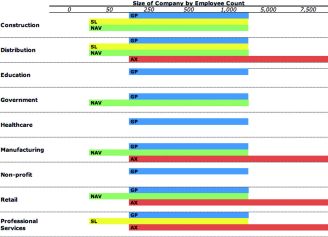
For starters, here is a chart that shows the target market for each product. Industries are down the side, business sizes are across the top, products lie in the middle.
Understanding the Microsoft Dynamics portfolio In 2001, Microsoft entered the server-based business applications market with the acquisition of Great Plains software. While it originally claimed otherwise, the acquisition was a strategic move to compete with enterprise software providers like SAP and Oracle. At stake were not only ERP applications revenues, but the database and operating system sales that are driven by new ERP projects.
As a result of this US$1.1 billion acquisition, Microsoft gained Great Plains Dynamics and Solomon, two accounting and business management systems, with 45,000 customers and 2,200 channel partners. This would give Microsoft a strong presence in the US, but the acquisition wouldn’t satisfy its global ambitions.
So, in 2002, Microsoft acquired Danish software company Navision, which offered enterprise-level accounting, human resources and CRM software.
Through this acquisition, Microsoft also gained the Axapta product, another enterprise system, which was originally developed by Damgaard – a company acquired earlier by Navision. Navision currently has roughly 70,000 installed customers with over 1.3 million users.
These four products – Great Plains, Solomon, Navision and Axapta – would make up Microsoft’s Business Solutions Group, later renamed ‘Microsoft Dynamics’. Of course, there were other smaller footprint products that had been acquired by each of these companies. Meanwhile, Microsoft has made subsequent acquisitions of related companies or technology assets.
Project Green – denied the green light
Microsoft now owned four different enterprise suites, each written in a different language, using a different development environment and sometimes running on different databases. Project Green was the code-name given to the task of converting all four products to a single code-base.
On one hand, Project Green would allow Microsoft to deeply integrate all four products with each other – and with their desktop and server software. This would extend the capabilities of each product, give users a shared experience and reduce the burden of support.
On the other hand, Microsoft would be faced with a very big technical challenge, and a customer-service challenge. The upgrade path for customers would be split – NAV customers might be three releases back, while GP customers might on the last release – and customers would face all the demands that come with an upgrade (training, implementation, etc).
Not to mention the fact that Dynamics partners that built their offerings around one of the products would also face a migration challenge.
So, Microsoft, eventually, changed its development strategy. Instead of rewriting the code-base from the ground up, it opted for a top-down approach of integrating existing technology from the Microsoft stack.
Subsequently, the company re-branded the products to the current nomenclature:
Dynamics GP, Dynamics SL, Dynamics NAV and Dynamics AX. For a detailed history of Project Green, we suggest reading Frank Scavo’s blog (http://fscavo.blogspot.com).
Natural selection
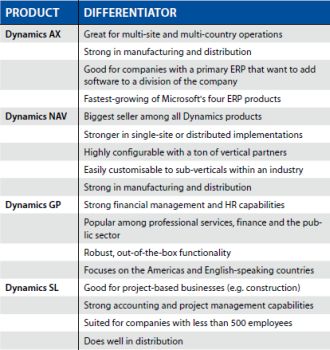
Over the years, each Dynamics product has naturally become popular in certain industries. For example, Dynamics GP – known for its strong general ledger and human resources (HR) capabilities – has become popular for professional services and the public sector.
Here is a quick breakdown of how the others have evolved:
Keep in mind that there are roughly 9,000 independent software vendors (ISVs) that provide support and customisations for Dynamics products.
These partners have developed hundreds of industry solutions with deep vertical capabilities. So, it’s possible to find any of the above being used in any size or type of business.
Today, Microsoft is extending functionality outside the traditional scope of some products. For example, in the next release of Dynamics AX, it plans to add functionality for the public sector. This may be an indication of a move towards a single product – or fewer products – which would help save on future development and support costs.
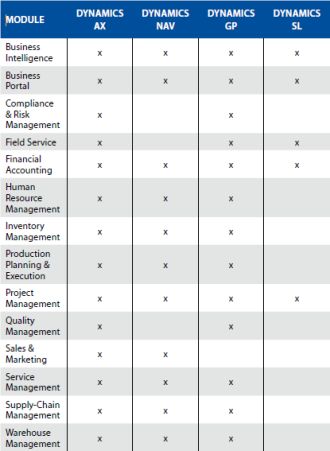
Moving towards one or two products is more conceivable when looking at an illustration like the chart below. Here is an apples-to-apples comparison of the modules within each product:
Where will it end?
The Dynamics’ roadmap stretches out to 2017, with all four products extending three versions out from the current release. What happens then? Will Microsoft move the products down market or up-market? Will users be encouraged to migrate to one system over another?
Speculation aside, we expect Microsoft to continue supporting and investing in each Dynamics product. New versions of each ERP product are due out in 2010 and new features (for example, ‘Environmental Sustainability Dashboard’) are being added on a regular basis.

Re-printed in edited form from Software Advice, an independent software analysis service(www.softwareadvice.com).
Wickliffe NZ Limited is an integrated print and supply chain management company that needed to update its existing ERP system to gain better visibility across the business and manage financials. This requires sophisticated scheduling, inventory management and billing systems which can support varying customer needs and a range of different inventory ownership models. With Microsoft Dynamics AX they have achieved this and more, with clearer reporting, real-time inventory tracking and cohesive data management.
The ERP challenge
Steve Silvey, chief operating officer at Wickliffe NZ says his company delivers customers a complete end-to-end solution, everything from managing orders, manufacturing/printing products and storage, to sourcing inventory and distributing around the country.
“The company has gone through a major restructure over the last few years, and we needed to expand our legacy system which had been customised to a point where it could no longer be easily upgraded. We just wanted a clean, fresh start. We needed an ERP system that could seamlessly integrate with our existing manufacturing system, PRISM, and online ordering tool, ECOS, while retaining the ability to be adapted and upgraded in the future.”
He said the system also needed to manage core financial functions, such as General Ledger, e-billing, purchase orders, accounts payable and accounts receivable, provide clear, accurate reports for inventory and stock management, be customised for specific processes and improve visibility across the supply chain
An end-to-end solution
Wickliffe worked with the Adaptable Solutions team, a gold certified Microsoft Dynamics partner to help scope, develop, customise and implement the Microsoft Dynamics AX solution to meet their requirements.
“Because Microsoft Dynamics AX uses the Microsoft Windows environment it’s more user-friendly for our team, quickly adopted and makes it much faster to train staff on. It’s also far more intuitive than our previous system, and allows us to combine information and create reports quickly and easily.”
It was an 18 month process due to the huge amounts of data that needed to be uploaded, integrated and cross-checked at each stage to ensure viability throughout the process.
One of the benefits of Microsoft Dynamics AX is it has the flexibility to enable deep levels of customisation to fit a business’ needs. For Wickliffe this included:
- Ability to manage customer-owned inventory alongside Wickliffe-owned inventory Warehouse manifests
- Courier ticket production and tracking
- Warehousing fee calculations, such as storage and order charges
The added value provided by Microsoft Dynamics AX to the Wickliffe team included a user-friendly, reliable and efficient ERP system, smooth integration with existing systems, greater visibility over inventory and logistics, streamlined processes, crisper, robust and accurate reporting, advanced inventory and warehousing management , improved efficiency and productivity and a solution which enables them to pass a number of the benefits onto customers.
“In the short term the solution has meant greater visibility for both us and our customers in the way we handle major projects, like printing, distribution and collection of Census and Election materials. In the long term we anticipate seeing significant cost savings through improved efficiency and staff productivity.”
Overall the company considered Microsoft Dynamics AX allows the team to manage its current processes more effectively and efficiently, and will also enable the company to continue customising the software as the market and customers needs change as well as support their continued growth.
AU: 1800 462 388 · +61 401 189 448